
If you manage company stores, you already know where the time goes.
It goes into the little jobs nobody prices into the program. A client wants gift cards sent today. Inventory changes and nobody catches it fast enough. A supplier sends a file that will not upload cleanly. A pop-up store launches next week and half the process is still living in somebody's inbox.
Right now, the pressure is real. PPAI reported nearly 49% of suppliers saw profit margins shrink over the past year. The same research shows about 30% of distributors reported declining margins too. PPAI also found 56.8% of companies cited tariffs as a major margin challenge. When margins are already getting squeezed, hidden admin starts to hurt.
I define that drag pretty simply. Friction is any task your people are doing that is not closely tied to generating revenue. In company store work, friction shows up everywhere.
McKinsey says fewer than 5% of occupations can be fully automated. That fits what I see. Nobody is automating the whole e-commerce manager job. But McKinsey also found about 60% of occupations have at least one-third of their tasks that could be automated. That is the real opportunity for store teams.
What no code looks like in a company store
No-code automation and practical workflow design go hand in hand – and with over 9,000 Zapier supported apps like Shopify, BrightStores, and Liftoff commerce, you can streamline your existing processes without switching platforms.
For company stores, those processes might start with a form submission, an inventory event, a CSV from a supplier, or an emailed report. From there, the system can do the boring part. It can create a gift card, unpublish a product, route an order, notify the right person, or generate a report.
That is what I want for you. Less clicking. Less copying and pasting. Less "can you do this real quick?" work.
Stop waiting on the roadmap
One of the worst habits in promo e-commerce is waiting for a platform roadmap to save you.
I work with industry tools all the time. I like a lot of them and many serve our industry well. But if you limit your operation to whatever a vendor ships next quarter, you are normalizing what you're capable of as a distributor.
I felt that pressure very clearly when an important client invited us to a demo of a competing company store platform. They were showing social media asset management features our existing stack did not support natively. We did not want to lose the client, and we did not want the client telling us what platforms we had to use. So we built the same capability with no-code tools like Zapier.
That is why, when I look at software, I want to see a Zapier integration or open APIs. Even if I do not need them today, I want to know the door is there. A walled stack always feels fine until the day you need one missing trigger.
Industry-specific tools can be tailor-made to your needs until they aren't. When the client asks for the next thing and the tool cannot get there, you need options.
Start with the work that keeps interrupting your day
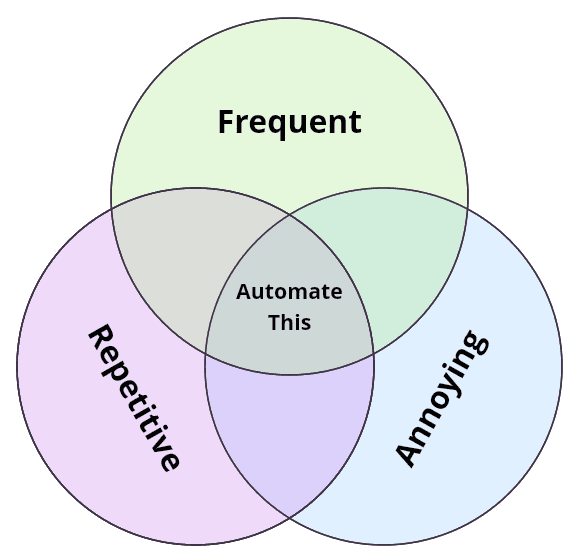
When I audit store workflows, I look for work that is frequent, annoying, and repetitive. I want clear and predictable inputs and outputs. I want tasks that do not depend on somebody's gut every single time.
That usually means data entry, spreadsheet wrangling, product publishing, budget management, gift card requests, inventory cleanup, and basic reporting. If somebody is copying information between systems, I am paying attention.
And if one person is the only person who understands the process, I am paying attention there too. You always have to ask whether the business is okay if that person does not show up one day.
Self-serve gift cards and budgets
For company stores, gift cards and budgets are usually the first quick win.
For example, Liftoff and other store platforms that I've used support gift cards and budgets, but many teams still manage them manually. A client emails a request for a new gift card code. Your team might ask for more details, eventually create the gift card code, and email it to the user. That is pure store admin.
I look at these applications pretty simply. They are forms and workflows on the backend. Once you recognize that, the path gets clearer. I can build a Zapier Form that lets an HR manager or program stakeholder submit the request on their own, gathering all of the needed inputs. The workflow then creates the gift card and sends the notification automatically.
I have built that workflow dozens of times because it works. It cuts support tickets fast. It takes work off customer service. And it encourages spending on the store, which is a nice side benefit.
If you are wondering where to start, start there.
Inventory aware publishing
Out-of-stock inventory is another easy place to win.
You know the pain. A size goes out of stock, but the product is still live and your client would rather products that are out of stock simply not appear in the store. Now your team is constantly monitoring for out of stock products and manually unpublishing them.
For Liftoff, I built a custom Zapier integration that fires the moment available inventory reaches zero. From there, the workflow can unpublish the variant automatically. If you'd prefer, for example, that the customer is still able to see that a Small option is available but you want them to know it is out of stock before they choose it, we can update the option value to something like "Small (out of stock)."
That is a great automation use case because it is highly deterministic. The trigger is clear. The rule is clear. The action is clear.
Clean supplier data before product setup
Product setup in your stores is a drag. I think every distributor I've met with has "the spreadsheet" – a monster of a document where sales, e-comm, and other teams come together to try and get all of the product data organized so that it can be uploaded to the store.
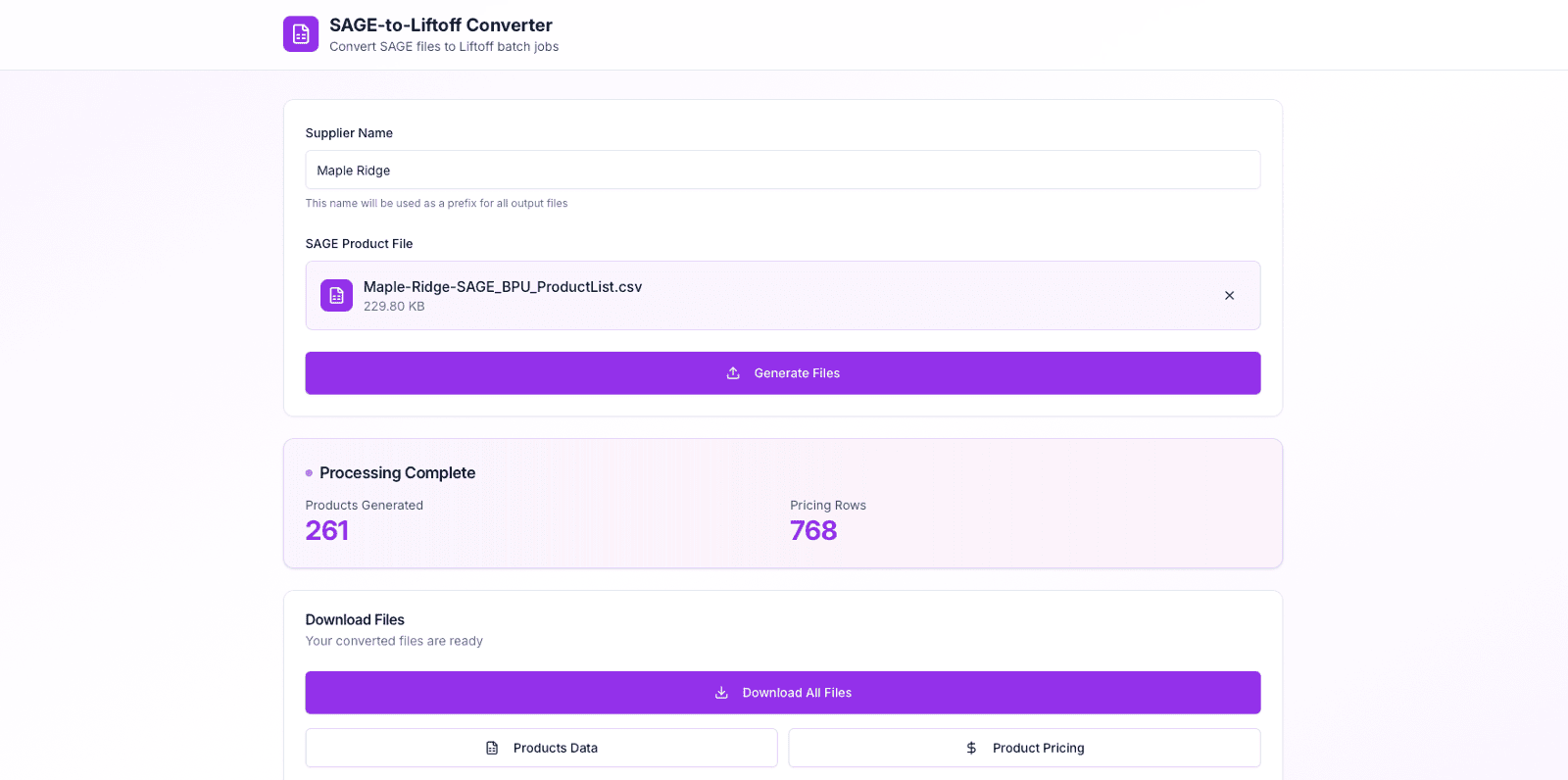
Recently, I asked Maple Ridge for their product data in a CSV so that I could reformat it for Liftoff. They sent me the same CSV they use to update their products in SAGE. I took that file and built a small utility in Zite to ingest it and output the format I needed for a Liftoff batch upload. The utility works with any SAGE Bulk Product Update (BPU) CSV so, hypothetically, if another supplier sends me their BPU, I can quickly reorganize it with my utility for upload to Liftoff.
That same approach works outside Liftoff too. Once the data is clean, you have choices. You can bulk upload it. You can make API calls if you need to. Most of the time, the bulk upload is faster and cheaper than trying to push every row of a spreadsheet through Zapier.
So clean the data first. Then automate what comes next.
Email hooks and repeatable redemption workflows
A missing API trigger is annoying, but it doesn't mean the workflow is DOA.
If a platform can send an email notification, that email can often become the hook or trigger. If it can send a report on a schedule, with CSV attached, that can work too.
I used that approach for a new-hire program where employees were supposed to receive a company store gift card as a welcome gift. At the time, there was no native Workday integration available to us in Zapier. But the client could email a report of new employees, so that report became the trigger. Zapier picked it up and kicked off the workflow.
Email hooks are a clever way to get around integration limitations – if you're interested in learning more about how to use email hooks, we have a course that covers them in the Aviators community.
Fix the process before you automate it
This rule matters more than any tool you pick.
If you're trying to automate a process that is inherently flawed, doesn't have clear ownership, is too subjective, you're just going to create more mess for yourself.
Step back and take a look at your process – does it trigger consistently or only under certain conditions? Are the inputs predictable? Will you always have the data you need downstream upon triggering? What about each action that is taken? Are they always taken, sometimes taken – do they even need to be there?
The best automation candidates have clear and predictable inputs and outputs. The data is structured. They do not rely on one person's gut feeling every time.
Keep humans at the right decision points
Obviously I'm a fan of automation. I am also very comfortable keeping a human in the loop when the process deserves it.
A good example is approval. If a client says any employee merch order over $5,000 needs review, that is a good place for a human checkpoint. I will automate up to that moment. I will present the information cleanly to the approver. Then the approver can click yes or no, and the workflow can continue from there.
I think the same way about anything touching accounting, or any low-confidence AI action. When the cost of being wrong is high, a human should stay in the loop.
Automation should elevate the human touch. It should give you time to use it where it matters.
Get e-commerce into discovery early
If you own store builds, integrations, or program administration, you belong in discovery early.
I see too many situations where a salesperson sells the world and the e-commerce team gets blindsided later. Then nobody is happy. The client heard a promise. The salesperson has egg on their face. Ops inherits the cleanup.
Bring your e-commerce or online services people into those conversations as early as possible. Requirements get clearer. Scope gets more honest. And you avoid a lot of late-stage panic.
Keep the stack simple and ownership clear
My tool selection process is pretty simple. I start with native capabilities. If the platform already does the thing, use it. If it does not, I look for a Zapier workflow. For e-commerce routing, vendor connections, and reporting, Order Desk often makes a lot of sense. Full architecture resets are a last resort.
Before I tell anybody to switch platforms, I want to know we have cracked the manual on the current one. A lot of tools look limited only because nobody is using the features or the Zapier integration they already have at their fingertips.
And if a SaaS provider later ships the feature that replaces a workflow I built, I am happy about that. You should never build something you can buy off the shelf. When you build your own workflows, you also inherit the support and maintenance overhead of that workflow. Don't get me wrong – you'll likely see a net gain of your time, but if there's a solution that is supported by your SaaS provider already, explore that first.
It is also worth remembering that no-code is not some fringe experiment. Zapier already handles over 3.1 billion tasks per month. This model is mature.
Give your team the keys
I always build in my client's environment.
Part of that is practical. It aligns with Zapier's terms of service, and I do not want permanent access to client data if I do not need it. But the bigger reason is empowerment. I want your team to own the workflow and understand it.
This is where team accounts matter. If your team is sharing one Zapier login, you are creating risk. It is poor security hygiene. It hides who owns each workflow. And when an error happens, the alert goes to one inbox instead of the person responsible for that Zap.
Nobody knows the processes that they're trying to automate better than the people who are doing the process. With the right tools and guidance, you can help those team members evolve into automation experts. Then put the right governance and access control around it.
That is how you grow an internal operational workflow wizard.
I care about that group a lot, which is one reason I we built the Aviators community. The behind-the-scenes heroes in this industry need support too.
Make your workflows visible
Automation should not feel like a black box.
If a workflow runs and nobody can see it, you are going to have problems. Not today, but eventually.
There are simple ways to keep your automations visible to you or your team. A completion email. A daily summary. A quick Slack message that confirms the workflow ran and shows what it did.
When something breaks, you want to know fast. When things are working, you want quiet confirmation.
After launching a new Zap, I usually keep a close eye on activity for a week or two. Fix the edge cases. Clean up the noise. Then let it run.
You do not need a full observability stack. You just need to know your workflows are doing their job.
Use AI where it actually helps
AI is useful when the task is narrow and the outcome is clear.
In company store workflows, that usually means things like summarizing feedback, cleaning up supplier data, or helping generate content for product setup.
It works best when it sits inside a defined process. A Zap triggers. AI handles one step. The workflow keeps moving.
Where teams get into trouble is expecting AI to manage the whole system. Company stores have too many rules, edge cases, and client-specific requirements for that.
I treat AI like any other step in a workflow. If it improves speed or quality, I use it. If it adds uncertainty, I don't.
That balance keeps things moving without creating new problems.
What you get back
Good automation gives you room.
It gives your store team room to work on the client experience instead of just processing requests. It gives customer service room to handle the issues that really need a person. It gives salespeople more time to pound the pavement and take a client to lunch.
It also protects the relationship. Automated inventory controls reduce cancellations. Self-serve budgets reduce back-and-forth. Repeatable redemption workflows cut launch stress. New-hire gift automations make a program feel polished and timely.
That is why I care so much about no-code automation for promo. It helps you run a cleaner operation without turning yourself into a software company.
If you are looking for a place to start, pick the workflow that keeps interrupting your day. Map the trigger. Map the actions. Tighten the process. Add the fail-safe. Then automate that one thing.
Do that a few times and the whole store operation starts to feel different.
Less cleanup. Fewer tickets. Faster launches. Better continuity.
I believe the future of this industry belongs to the operators. And the operators who get comfortable with automation tools are going to build better company store programs than the teams still waiting on the roadmap.
Frequently Asked Questions
How does workflow automation protect margins from the recent surge in rush orders?
Automation absorbs the shock. With over 30% of suppliers facing more frequent rush orders, manual processing bleeds your shrinking margins. Zero-code routing pushes unpredictable, urgent tasks through deterministic pipelines instantly, keeping your human team focused on exception handling rather than data entry.
Can no-code workflows manage fulfillment for non-traditional promo items like digital downloads?
Absolutely. When your company store platform lacks native digital fulfillment, an integration bridges the gap. A successful checkout webhook can trigger a secure file delivery via email or generate a unique download link. It treats digital assets exactly like physical inventory, just with a different routing destination.
Will automating our promotional pop-up stores completely replace our e-commerce admin team?
No. According to industry analysis, fewer than 5% of occupations can be fully automated. The goal is removing friction, not replacing people. Automation handles repetitive publishing so your e-commerce managers can focus on complex client demands, user experience improvements, and overall program strategy.
How do we trigger workflows if our company store platform lacks a native Zapier integration?
You look downstream. If you cannot trigger from the platform directly, intercept it elsewhere. An automated order confirmation email or a scheduled CSV export can act as your hook. Integration tools easily parse those incoming emails to reliably trigger automated workflows as needed.