
If you've ever wished a website had one more button, showed a little more information, or automated a repetitive task, PixieBrix can probably make it happen.
And you don't have to be a developer to build it.
Between its no-code builder and the new AI Copilot, it's surprisingly approachable. You can describe what you want, let AI help build it, then tweak it until it works the way you want.
What is PixieBrix?
PixieBrix is a browser extension that lets you customize websites and web applications with small apps they call browser mods. Think of them as little upgrades for the software you already use.
Maybe you want a custom button inside commonsku that launches a workflow. Maybe you want to pull customer information from another system without opening another tab. Maybe you want AI to summarize a page before you send an email.
Instead of waiting for the software company to build those features, you can build them yourself.
And thanks to their AI Copilot, you don't have to start with a blank canvas anymore. It does a great job helping you build, troubleshoot, and improve your browser mods as you go.
How We've Been Using It
Push Supplier Information into Zoho CRM
When we're working with suppliers in commonsku, there are times we want that supplier information available in Zoho CRM as well.
We built a custom button that takes the supplier information from commonsku and sends it directly into Zoho CRM. What used to involve copying and pasting between two systems is now a single click.
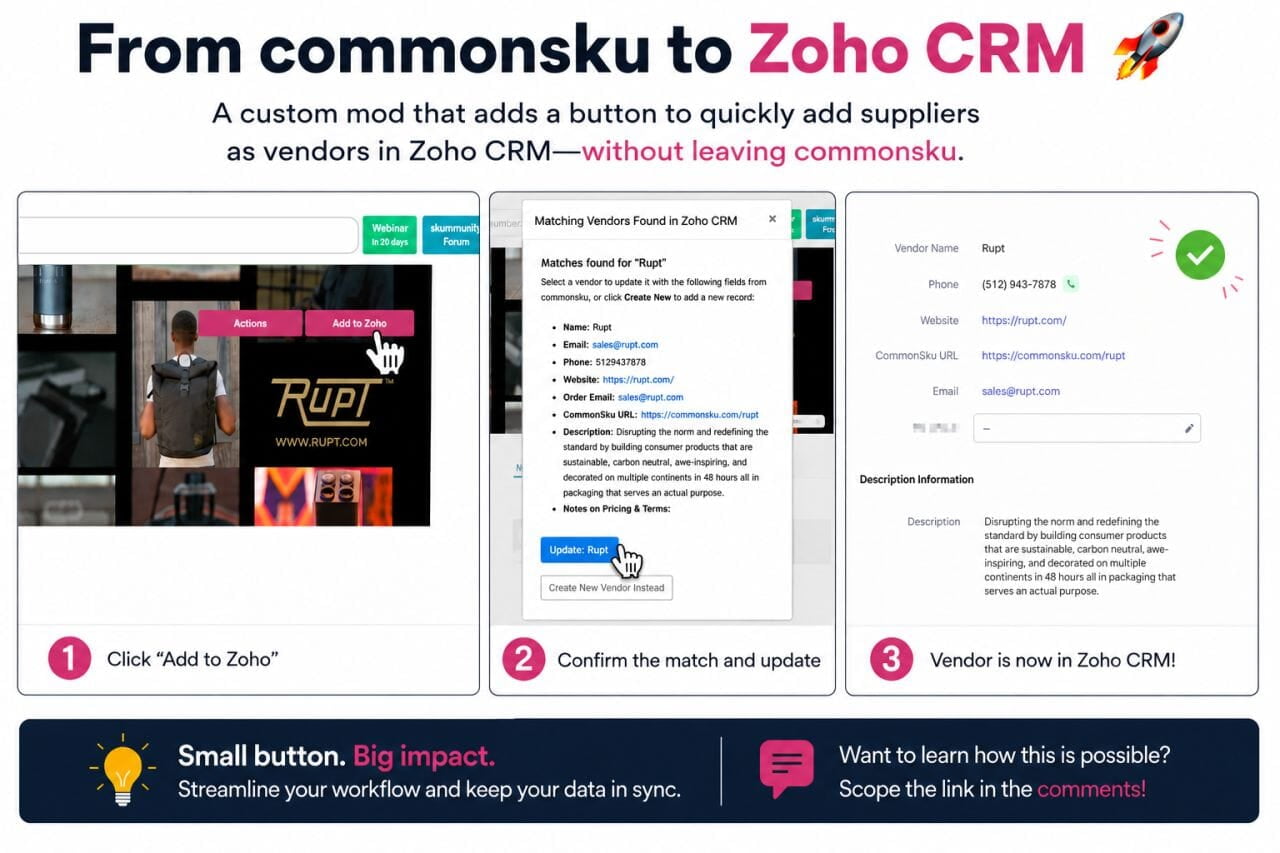
Keep Contact Records in Sync
We added another button that syncs contact information from commonsku to the matching contact in Zoho CRM. Before making any changes, PixieBrix displays a comparison window that shows the existing CRM data alongside the updated information from commonsku.
That gives the user a chance to review everything, make edits if needed, and confirm the update before anything is written to the CRM. It's a small touch, but it gives everyone confidence that the automation is doing exactly what they expect.
Automate Inventory Receiving Logs
We also built a browser mod that reads information from a commonsku sales order and uses it to fill out an inventory receiving log automatically.
Instead of manually copying order details into another system or spreadsheet, PixieBrix gathers the information for us and starts the process with a single click.
It's one of those automations that only saves a few minutes each time, but when you repeat that task throughout the week, those minutes add up.
That's What Excites Me About PixieBrix
None of these browser mods are especially flashy. They're simply little improvements that make the software we already use fit our workflow better.
For years, we've all gotten used to adapting our processes to match the software we buy. If there's something missing, we submit a feature request, cross our fingers, and hope it shows up in a future release.
Sometimes it does. Often, it doesn't. PixieBrix flips that idea on its head.
Instead of waiting for a software vendor to build the feature you want, you can build it yourself.
You don't need to be a developer. You don't need to hire one either. Between the no-code building blocks and AI Copilot, PixieBrix does a remarkable job helping you create browser mods that solve real business problems. You describe what you want, AI helps you build it, and you refine it from there.
I think that's what makes the platform so exciting. It gives everyday users the ability to customize the software they rely on every day. And once you start looking for opportunities, you see them everywhere.
Promo Distributors Should Pay Attention
Our industry lives in the browser. We spend our days jumping between industry tools, supplier websites, CRM systems, email, artwork portals, shipping tools, and dozens of other web apps. They're all good at what they do, but they weren't designed specifically for your business.
Every distributor has little annoyances they've learned to live with.
- "I wish this page showed one more piece of information."
- "I wish I didn't have to copy this into my CRM."
- "I wish there was a button that did this for me."
Those are exactly the kinds of problems PixieBrix can solve. Instead of accepting those little gaps as "just the way it works," you can start filling them in yourself. And because it's no-code (with a lot of help from AI), those ideas are much more achievable than they would have been just a few years ago.
Watch PixieBrix in Action
The PixieBrix team put together an excellent overview of the platform that does a great job showing what's possible.
If this article sparked a few ideas, I think you'll enjoy seeing how PixieBrix works in practice.
Final Thoughts
I've always enjoyed finding ways to automate the repetitive parts of work. Sometimes with Zapier. Sometimes with AI. Sometimes it's a custom app.
Lately, PixieBrix has become another favorite because it fills a different niche. Instead of connecting systems behind the scenes, it improves the experience of the software I'm already using.
I no longer assume that every missing feature has to stay missing. If there's something that would save a few clicks, reduce copy-and-paste, or bring information together in a better way, there's a good chance we can build it ourselves.
That's a fun way to think about software.
FAQs
Is PixieBrix a replacement for Zapier?
No, and you don't need to pick one and, in fact, you can use PixieBrix with Zapier. PixieBrix is strongest when the workflow starts on a live web page and needs a human to review something before it runs. Zapier is great for event-driven, API-to-API connections. I use both. They're not competing for the same job.
Do I need a commonsku Enterprise plan for this?
No. PixieBrix reads data directly from your browser. It doesn't need commonsku API access at all.
Does PixieBrix send my data somewhere I don't control?
Not by default. Page data stays in your browser and only goes anywhere if your mod explicitly sends it. In this case, that's Zoho CRM, which you configure. For teams with stricter requirements, PixieBrix is also SOC 2 Type 2 certified with third-party pen testing.
What if commonsku changes its page layout and breaks my selectors?
That's a real consideration with any browser-layer tool. PixieBrix's Data Panel makes it easy to find and fix a broken selector when it happens, but this isn't set and forget. The fix is usually quick. It's just worth knowing upfront.