There's a lot of talk about AI agents doing work that used to take a person. They can browse websites, fill out forms, retrieve information, and finish multi-step tasks.
What gets lost in the excitement is that software has been doing many of these things for decades. What's changing is how computers figure out what needs to happen, how they interact with other systems, and how much judgment we can hand them.
If you've used Zapier to connect two apps, you've already used automation. If you've watched an AI assistant navigate a website and complete a task, you've seen a different kind. Neither makes the other obsolete. To see where AI fits, it helps to know how automation actually works.
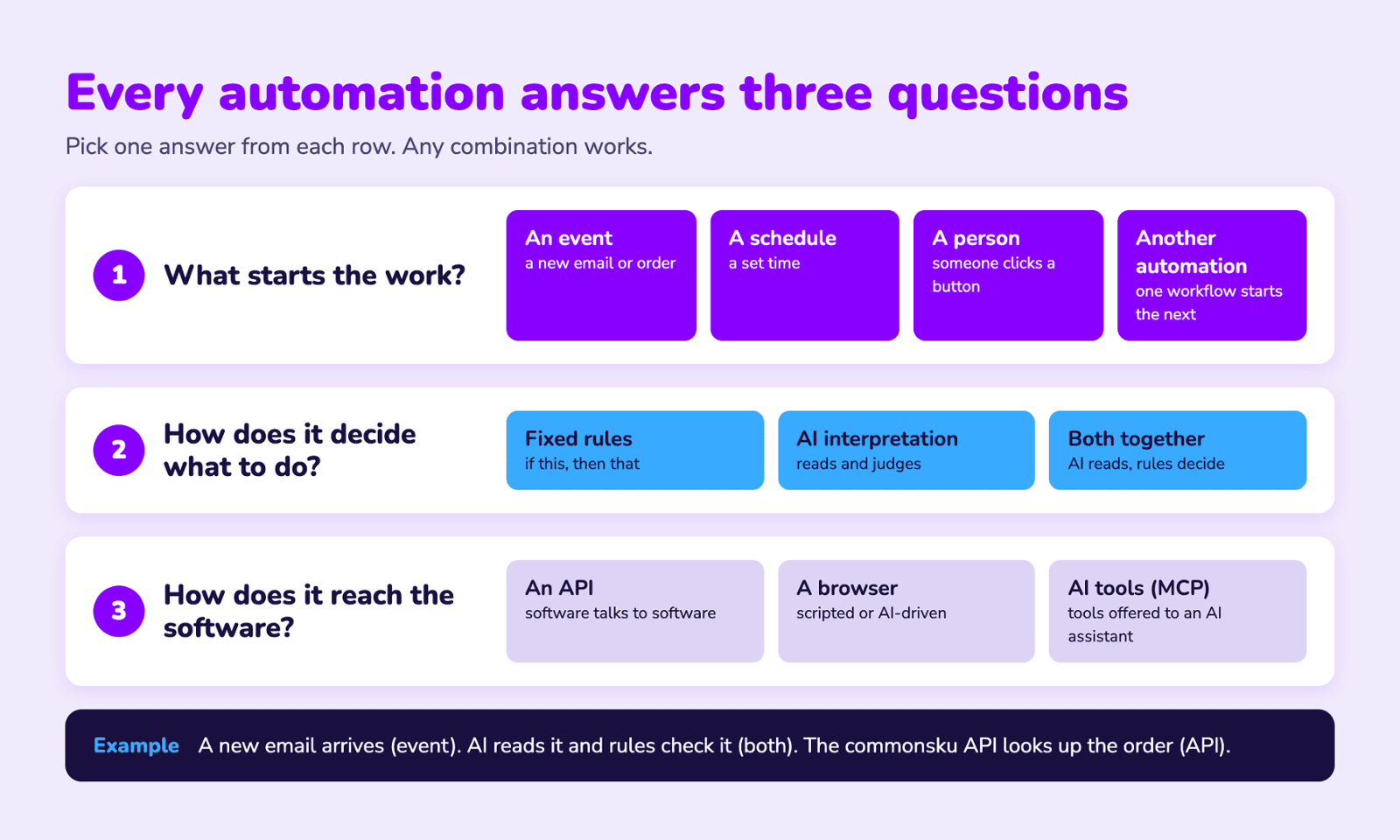
Three questions that describe any automation
- What starts the work? An event, a schedule, a person, or another automation?
- How does it decide what to do? Predefined rules, AI interpretation, or both?
- How does it interact with software? An API, a browser, or a tool made available to an AI assistant?
The answers are independent of one another. An AI agent might use an API. A traditional automation might operate a browser. A workflow might use AI to read a customer email, then follow strict rules to decide what happens next.
APIs: software talking directly to software
An API (application programming interface) gives software a defined way to interact with another system. All an API is, really, is a funny-looking email that one app sends to another. Or think of a service counter. Instead of walking into the warehouse and searching the shelves yourself, you submit a specific request and get a structured response.
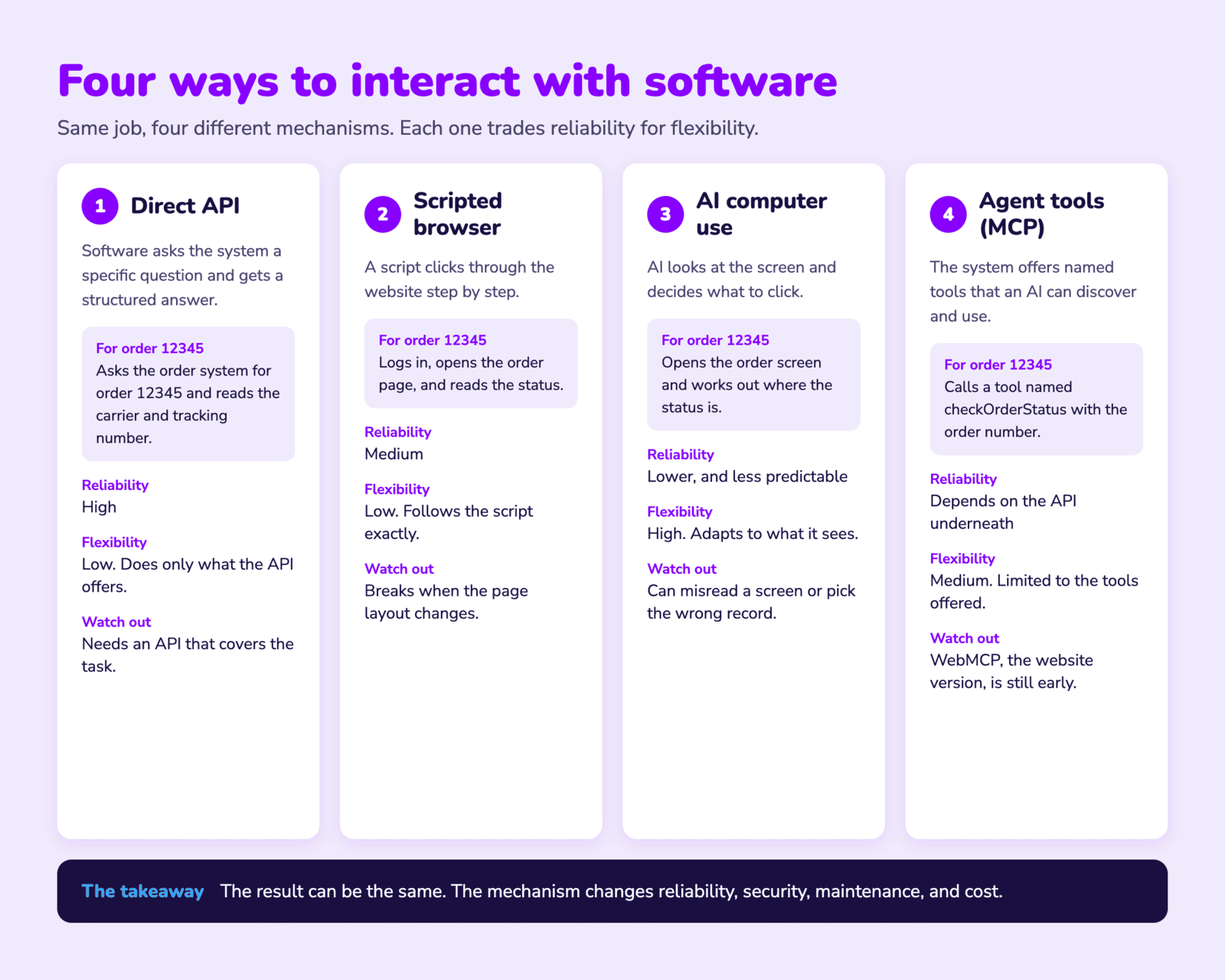
An automation might ask an order management system, "What's the shipping status of order 12345?" and get back the carrier, tracking number, and ship date. Nobody opens the app, navigates to the order, or copies anything off a screen. In promo, commonsku works this way. It has an API, so an automation can look up or update orders without anyone logging in. On the supplier side, PromoStandards web services play a similar role for things like order status and shipment notifications. Because the interaction follows a defined structure, APIs are generally among the most reliable ways to automate a process.
Where Zapier fits
Zapier (and Make, n8n, and others) is an automation platform that connects apps and coordinates workflows. When a Zap creates a contact in Zoho CRM, it usually talks to Zoho's API behind the scenes. Zapier can also use webhooks, code, and other methods, so it's an orchestration platform rather than a single interaction technology. Many promo tools plug in directly. Dynamic Mockups, for example, has a Zapier integration, so a Zap can request a product mockup as one step in a larger workflow.
What about webhooks?
RPA: software operating the interface
What if an app has no API that supports what you need? One option is robotic process automation, or RPA. There's usually no physical robot involved. RPA software works with applications much as a person would: it clicks buttons, types into fields, navigates menus, and copies data between systems.
Say an accounting app requires someone to key in invoice details. An RPA bot could open the app, go to the invoice screen, fill in the fields, and save the record.
Traditional RPA follows predefined instructions and doesn't necessarily understand the business purpose of what it's doing. If a button moves or the app changes, the automation may break. Automating a person's actions isn't the same as understanding their decisions.
Newer RPA tools are adding AI features, such as reading invoices and pulling data from scanned forms. The core idea is still the same, though: repeat steps that someone defined ahead of time.
RPA also doesn't have to be expensive. Zoho RPA is a lower-cost option with a free plan and a free trial, and it works with other Zoho apps. If you already live in the Zoho ecosystem, it's worth a look for jobs that have no API.
Browser automation: related, but different
Browser automation is similar to RPA but limited to websites and web apps. Tools like Playwright and Puppeteer control a browser programmatically. They can navigate pages, click elements, fill in forms, download files, and extract information.
A promotional products distributor, for example, might need data from a supplier portal that has no suitable API or PromoStandards service. A browser automation could log in, find an order, read its status, and pass it to another system.
Where cloud automation platforms fit
Is browser automation the same as scraping?
Not quite. Browser automation describes how software interacts with a website. Scraping describes pulling information out of one. A browser automation might submit an order without extracting anything. A scraper might fetch product details without ever opening a full browser. They overlap often, but the terms aren't interchangeable.
AI computer use: AI operating the interface
Traditional browser automation follows instructions written in advance. AI computer-use systems can interpret a task, look at an interface, and decide what to do. Instead of scripting every click, you might say, "Find the three orders that haven't shipped and prepare a summary for the customer." An AI system with computer-use capabilities could navigate the order management interface, find the relevant information, and work through the task. Claude and other AI systems can do this, depending on the tools and environment available to them.
The difference isn't just that AI can click buttons. It's that AI can decide which buttons to click based on what it sees and what it's trying to do. That flexibility helps when tasks aren't fully predictable.
It also adds uncertainty. AI can misread an interface, pick the wrong record, or take an action nobody intended. Interfaces change, and computer-use systems can be slower and less predictable than structured integrations. For a repeatable process with a reliable API, having AI navigate the interface may add complexity instead of removing it.
MCP: giving AI access to tools
You may have started hearing about MCP, the Model Context Protocol. It's an open standard that lets AI applications connect to external tools and information sources through a common interface.
Say you ask an AI assistant to pull customer information from your CRM. Without a suitable integration, it may have no way to get it. With an MCP server exposing the right tools, the assistant can discover what's available and request that a tool be used. An MCP server might offer tools to search for a customer, retrieve open sales orders, look up shipment information, or create a follow-up task. The assistant picks the one that fits the request. Servers can also expose data and reusable prompts, not only tools.
Does MCP replace APIs?
No. An MCP server often calls existing APIs to do the actual work. The API connects to the underlying system, and MCP gives AI applications a standard way to discover and use that capability. Think of an API as a service an app offers, and MCP as a common way for AI assistants to find and request those services.
MCP doesn't make an automation intelligent. The model supplies the reasoning, and the MCP tools supply the capabilities.
WebMCP: websites exposing tools to AI agents
The distinction that matters
- Call an API directly.
- Use an MCP tool that calls the API.
- Use a WebMCP tool the website exposes.
- Follow a scripted browser automation.
- Navigate the website visually with AI computer use.
Deterministic automation vs. AI interpretation
So far we've covered how automation interacts with systems. The other question is how it decides what to do.
Deterministic automation
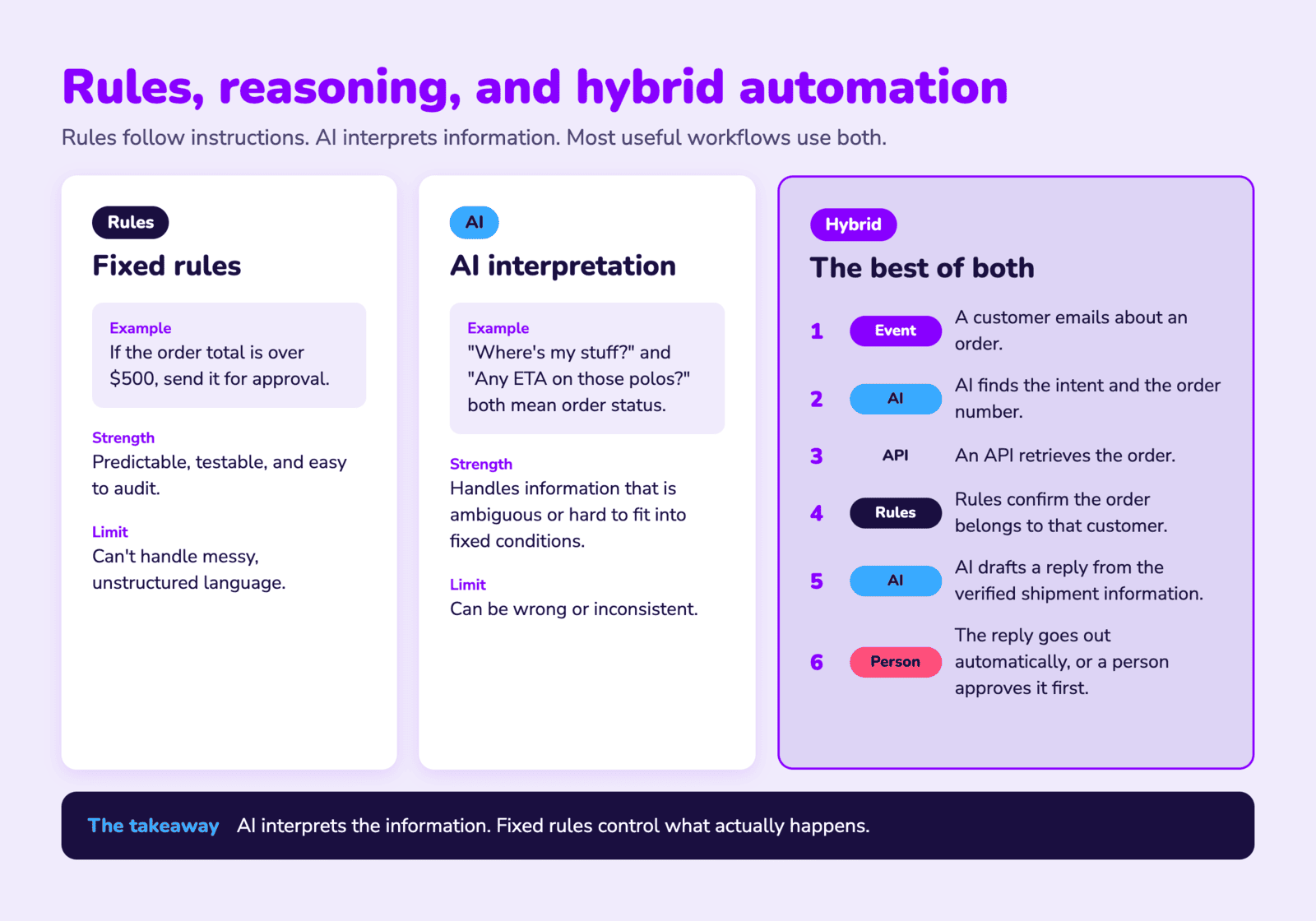
A deterministic workflow follows explicitly defined rules, such as "If the order total exceeds $500, send it for approval." The condition and the action are clear, and given the same inputs and rules, the workflow is designed to produce the same result. Much of traditional business automation works this way. It's predictable, testable, and usually easy to audit.
AI interpretation
Instead of relying only on predefined rules, an AI model interprets information and produces a response, classification, recommendation, or decision. For example: "Read this customer's email and determine whether they're asking about shipping, pricing, or a product problem."
Customers don't all use the same words. One writes, "Where's my stuff?" Another asks, "Do you have an ETA on those polos?" A model can recognize that both are about order status, which a simple keyword rule wouldn't catch. That makes AI useful when information is ambiguous, unstructured, or hard to capture in fixed conditions. But its outputs can be wrong or inconsistent.
Hybrid automation: often the best of both
- A customer emails asking about an order.
- AI identifies the intent and pulls out an order number.
- An API retrieves the order.
- Deterministic rules confirm the order belongs to the customer.
- AI drafts a reply from the verified shipment information.
- The reply is sent automatically or routed to a person for approval, depending on the workflow's rules.
What actually makes something an AI agent?
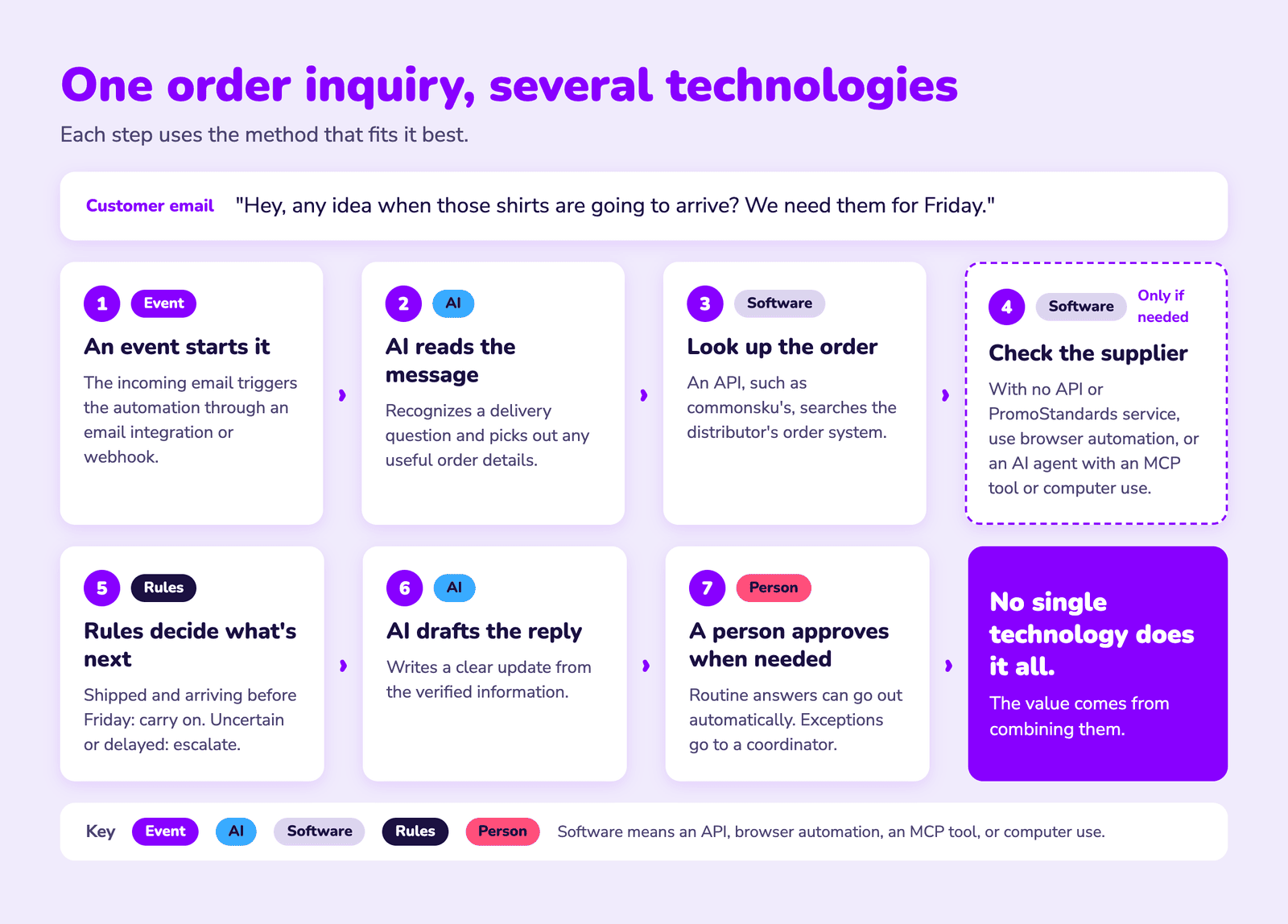
One workflow, several technologies
- An event starts the workflow. The incoming email triggers the automation through an email integration or webhook.
- AI interprets the message. The model recognizes a delivery status question and picks out any useful order details.
- The automation retrieves the order. An API, such as commonsku's, searches the distributor's order management system.
- Additional information is collected. If the supplier's shipment status isn't available through an API or a PromoStandards service, the workflow might use browser automation to get it from a supplier portal. Or an AI agent might use an available MCP tool or computer use.
- Rules decide what happens next. If the order has shipped and tracking confirms delivery before Friday, the workflow proceeds. If the date is uncertain or the order looks delayed, it escalates.
- AI drafts the response. Using the verified information, it writes a clear customer update.
- A person approves when needed. Routine inquiries can be answered automatically. Exceptions go to a coordinator for review.
No single technology does all of this. The value comes from combining them.
A quick word on security
- Give the AI the least access it needs. Start with read-only.
- Require a person to approve anything that sends, deletes, pays, or changes a record.
- Use fixed rules for checks that must never fail, like confirming an order belongs to the customer.
- Connect only tools and servers you trust.
- Keep a log of what the AI did.
Which method should you use?
There's no universal winner. This table is a rule of thumb, not a guarantee.
| Method | What it does | Reliability | Setup effort | Best for |
|---|---|---|---|---|
| API or webhook | Software talks directly to software | High | Low to medium | Repeatable tasks when an API exists |
| RPA | A bot repeats the clicks and typing a person would do | Medium (breaks when screens change) | Medium | Apps with no API |
| Scripted browser automation | A script drives a browser step by step | Medium (breaks when the site changes) | Medium to high | Websites and supplier portals with no API |
| AI computer use | AI looks at the screen and decides what to click | Lower and less predictable | Low to start, but needs close oversight | Messy, variable tasks nobody has scripted |
| MCP | Gives AI assistants a standard way to use your tools | Depends on the API underneath and the AI's choices | Medium | Letting an AI assistant look things up or take actions in business systems |
| WebMCP | Websites offer tools directly to AI agents in the browser | Promising, but early | Depends on the site supporting it | A future option, not widely available yet |
A simple way to choose
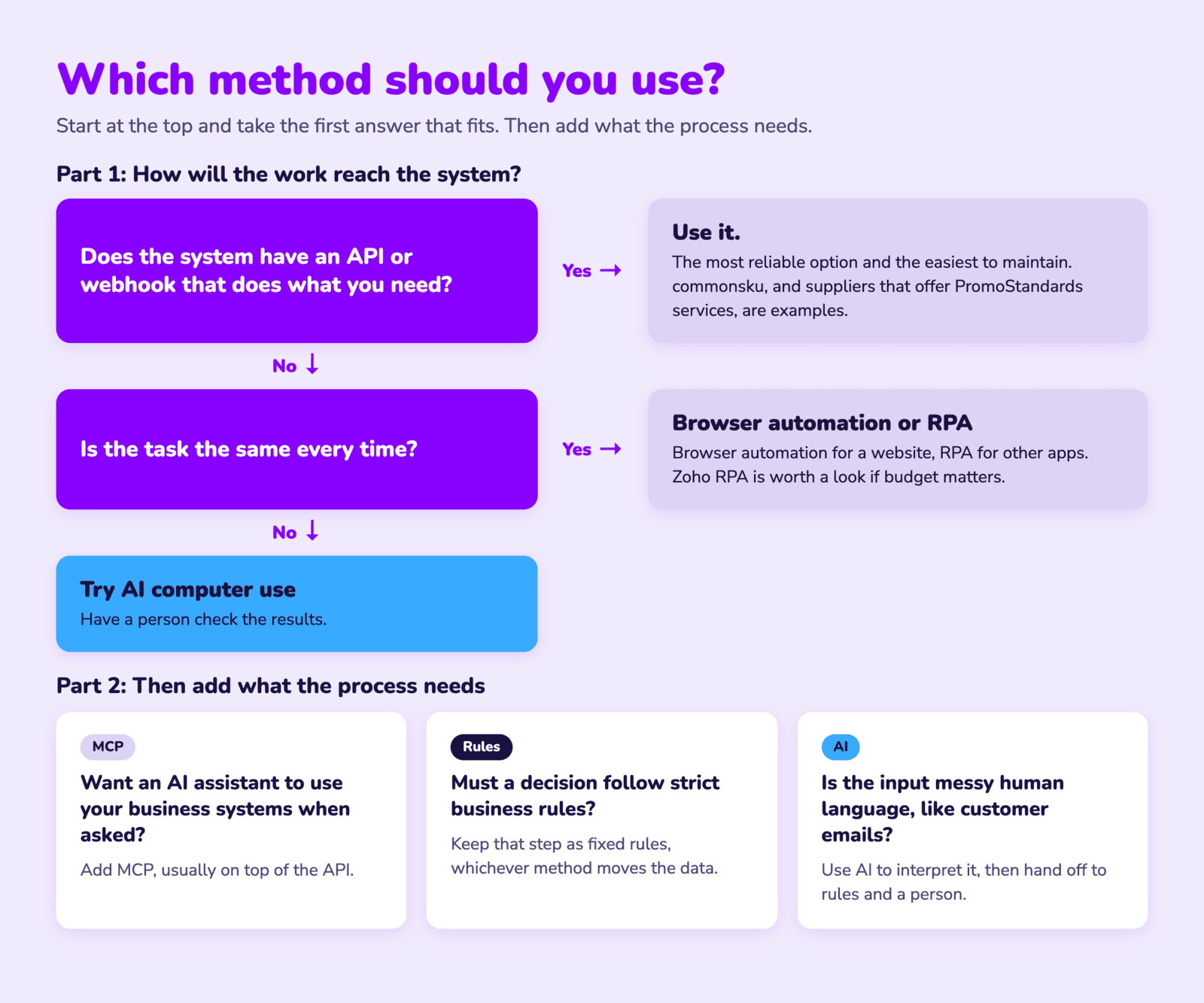
- Does the system have an API or webhook that does what you need? Use it. It's the most reliable and the easiest to maintain. commonsku, or a supplier that offers PromoStandards services, are examples.
- No API, but the task is the same every time? Use browser automation for a website, or RPA for other apps. Zoho RPA is worth checking if budget matters.
- No API, and the task varies or needs judgment about what's on screen? Try AI computer use, with a person checking the results.
- Do you want an AI assistant to use your business systems when asked? Add MCP, usually on top of the API.
- Does a decision have to follow strict business rules? Keep that step as fixed rules, whichever method moves the data.
- Is the input messy human language, like customer emails? Use AI to interpret it, then hand off to rules and a person where it matters.
The bigger picture
More business software can now be operated by AI, not just integrated through traditional automation platforms. That's a real shift, but it doesn't erase the value of APIs, webhooks, RPA, or the deterministic workflows businesses already depend on. It adds options.
The most capable systems won't be the ones that use AI for everything. They'll be the ones that know when to use AI, when to follow rules, and how to interact with each system reliably. For distributors, suppliers, and other businesses trying to make better use of automation, understanding those distinctions is a good place to start.