What Zoho Social is
What's in the box
Inbox and engagement
Monitoring and listening
The listening dashboard lets you set up columns that track your brand name, @mentions and keywords. I'd add one for your top suppliers or a few industry terms. A live stream tab shows engagement on your posts as it happens, so you can jump in while people are still paying attention.
Collaboration
You can give reps, an assistant or an agency access to only the channels and features they need. Approval workflows mean nothing goes live until someone signs off. Teammates can be tagged on posts and reports, and you can talk through drafts over chat, audio or video inside the app.
Analytics and reporting
Integrations
The Zoho CRM integration turns social engagement into leads and shows which channels bring in revenue. If you only set up one integration, I'd start here. The Zoho Desk integration turns a social complaint or question into a support ticket so it doesn't get lost.
Adding AI with the Zoho Social MCP
How I use it
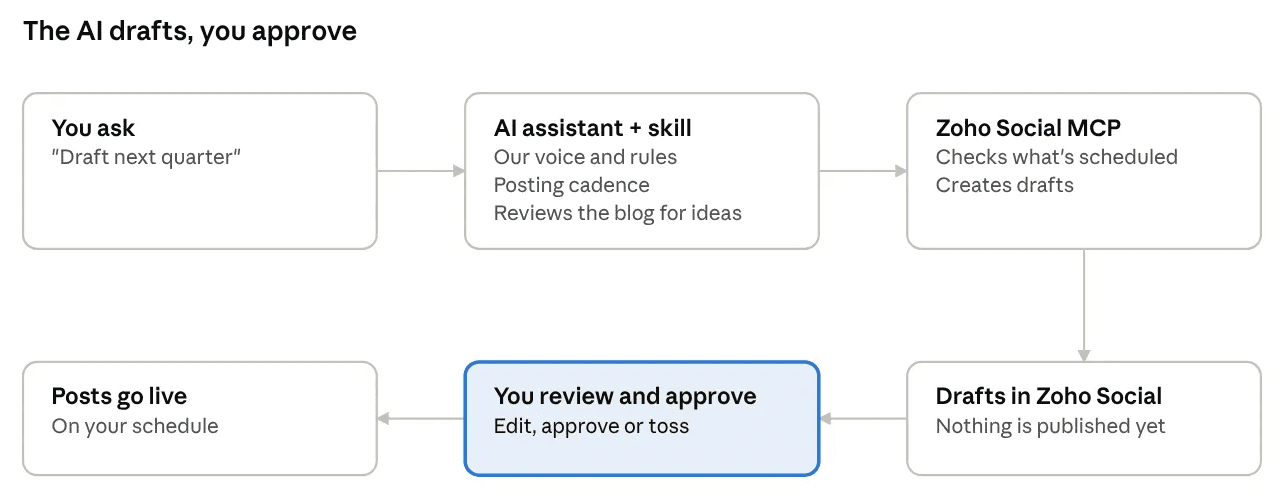
I still approve everything
Start small
- Connect one or two channels. For most distributors, LinkedIn is the place to start.
- Schedule a few weeks of posts by hand so you get comfortable with drafts, the calendar and queues.
- Once you know what a good post looks like for your business, connect the MCP server and let an assistant draft while you approve.